Skype is hogging the taskbar. How do I reduce it to an icon?
mr.magoo Joined Sep 27, 2010 Messages 286 Reaction score 2 Jan 10, 2012 #1 Skype is hogging the taskbar. How do I reduce it to an icon?
Elmer BeFuddled Resident eejit Joined Jun 12, 2010 Messages 1,048 Reaction score 251 Jan 10, 2012 #2 Can you show us a screenshot??
mr.magoo Joined Sep 27, 2010 Messages 286 Reaction score 2 Jan 11, 2012 #3 Here 'tis... Attachments Capture8.PNG 29.4 KB Views: 613
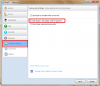
Elmer BeFuddled Resident eejit Joined Jun 12, 2010 Messages 1,048 Reaction score 251 Jan 11, 2012 #4 That's right click taskbar, Properties and change Taskbar buttons to Always combine, Hide labels. Which will affect every taskbar button. OR In Skype, go to Tools -> Options. Then, click on Advanced tab to go to Advanced settings. Uncheck and untick the Keep Skype in the taskbar while I’m signed in option and click Save. When you use the "Red X" to close the Skype window it will now minimise to the System Tray.
That's right click taskbar, Properties and change Taskbar buttons to Always combine, Hide labels. Which will affect every taskbar button. OR In Skype, go to Tools -> Options. Then, click on Advanced tab to go to Advanced settings. Uncheck and untick the Keep Skype in the taskbar while I’m signed in option and click Save. When you use the "Red X" to close the Skype window it will now minimise to the System Tray.
zigzag3143 Wanikiya Microsoft MVP Joined Sep 22, 2010 Messages 268 Reaction score 110 Jan 11, 2012 #5 Or just show Icons with no text. Attachments 1-10-2012 11-55-22 PM.jpg 7.3 KB Views: 540
bassfisher6522 Joined Feb 9, 2010 Messages 748 Reaction score 126 Jan 11, 2012 #6 zigzag3143 said: Or just show Icons with no text. Click to expand... Yep...that's how I have mine set.
zigzag3143 said: Or just show Icons with no text. Click to expand... Yep...that's how I have mine set.