- Joined
- Jan 6, 2010
- Messages
- 363
- Reaction score
- 57



These problems are not due to some Microsoft decision, but a problem on that machine - most likely an Update that was not properly applied. Otherwise, there would be millions of users with this problem.Microsoft in their crazy wisdom

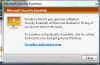
Yes it did say that but when Windows does pass MSE doesn't correct itself. In fact the first time I had no choice but to un-install MSE to correct the issue. Once MSE 4.0 came out the button MSE has to auto correct finally worked.Note it is saying Windows did not pass.


I think your windows 7 copy is not geniune...

No they didn't.Although it is obvious, Microsoft lied about MSE being free.
That's nonsense! It is completely free! It is even completely free for commercial use by small businesses with up to 10 computers! I was going to suggest something a bit more drastic - uninstall MSE, then download and reinstall MSE again. This will ensure a fresh rewrite of the files and settings.Try a manual update of MSE and see if the message clears.
No problems sice I uninstalled and then reinstalled MSE. I am patiently waiting to see if it happens again. There is no way that Windows 7 is not legit, it came direct from MS when it was first launched.No they didn't.
What's obvious is distrust and dislike of Microsoft, the company, feeds into typing fingers and that distrust and hate of the company bleeds over into opinions of their products.
MSE is free. Period.
I see no problem with Microsoft (or any company) checking to see if you are using a Genuine copy of their product. In fact, I applaud them for it. Why? Because (1) pirated copies of Windows and other software are common sources of malware, and (2) the software thieves who use illegally obtained software or licenses often fail to keep their systems patched and updated for fear of being caught. Either way, that makes those users and their vulnerable machines PRIMARY TARGETS of the badguys seeking easy pickings to compromise, draft into their bot armies, and turn into major threats against the rest of us as spamming machines, DDoS attacks or distributors of malicious code. And Microsoft, tired of years of relentless, unwarranted, and opportunistic bashing for a security situation they did NOT cause, is doing something about it.
Sure, they are tired of losing $100s millions in annual sales. Lost sales, like shoplifting, is something everyone has to pay for. But the sullied security situation they did not cause hurts (you, me, taxpayers, and them) more.
That said, it IS a problem when genuine copies are tagged as non-genuine. But "false positives" (which is what I think happened here) happen - and no product maker likes them. Whether it be your spam blocker, virus checker, or genuine product identifier. Users don't like them. And in fact, too many false positives is one reason (albeit a small reason) I no longer use AVG.
But the reality here is Windows often does this because multiple system files it checks have been modified - often by malware activity, collateral damage from malware or its removal, or some other unfortunate circumstance besides a bad database entry at Redmond. Often, running sfc /scanow can fix that.
Sadly, I have seen this caused by misguided users and computer repair "pros" too - who don't use the correct disk during a recovery/repair process.
I was going to suggest something a bit more drastic - uninstall MSE, then download and reinstall MSE again. This will ensure a fresh rewrite of the files and settings.
@andsome - If you run Windows Update, do you get the genuine validation warning?
I don't think anyone here doubts that or you. This appears to have been a "false positive". Regrettable, should never have happened, but they do. And like here, most have happy endings.No problems sice I uninstalled and then reinstalled MSE. I am patiently waiting to see if it happens again. There is no way that Windows 7 is not legit, it came dorect from MS when it was first launched.
No its not, if it was it wouldn't be tied to Windows activation. Anything that has a cost or conditions to use is not free. I don't have a problem with MSE having terms of use. And I don't care about your opinion, when it contradicts what I know to be true.MSE is free. Period.
Only when falsely accused. I have been very critical of MS on many occasions - in particular, of their business, marketing and PR decisions. The fact remains, their software is good stuff.You have posted a wall of text showing how much you are a supporter of Microsoft, no matter what they do or in this case possibly what they didn't do.
I see. But accusing Microsoft of lying was? And andsome's problem was based Microsoft's alleged[/u] lying too? Or were those just opportunistic jabs, with absolutely no basis for association with andsome's problem?You have posted to prove a point...that was not even based about the issue I stated I had.
Do you not understand that (1) your situation and andsome's situation are different, though similar and (2) that there was some error, corruption or other fault that caused these errors, (3) the vast majority of users are not having these problems because it does work, and (4) a fault on your system is not automatically due to some decision at Microsoft?Do you not have anything to say about MSE not re-activating itself when Windows does? Do you not understand that if one passes validation, they both can be updated at the same time? But in Microsoft's lack of wisdom they never integrated the two to take advantage of one validation check.
Exactly. And if you follow the "*" after the word "free" on the MSE download page , it says, * Internet access fees may apply while downloading. Your PC must run genuine Windows to install Microsoft Security Essentials. I guess you could they lied there too - unless you live somewhere where free Internet access is available.There are lots of things where you have to meet certain terms and conditions to get them for Free. There is no monetary cost IF you meet the conditions.
Me too.Goodbye have fun, I'm tired of the bickering between us.
Where did I ignore you! You say MSE is not free but you ignore what I, AND OTHERS say, and you ignore links to the official source that collaborate our claim.I'm not gonna repeat myself when you choose to ignore what I say.
Source: MSE* Internet access fees may apply while downloading. Your PC must run genuine Windows to install Microsoft Security Essentials. | Microsoft Security Essentials Privacy Statement | Microsoft Security Essentials License Agreement