- Joined
- Feb 11, 2009
- Messages
- 18
- Reaction score
- 0
Folks need help.
I have a folder containing quite some .wmf files. These files are cliparts
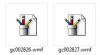
But when I open this folder the cliparts show up as enlosure and this I hate... I have imported these from an Win XP machine to my new Win 7 pro machine.
How can one set the icons to show the clipart in "real" so to say.
I can open one at a time with Paint or Windows Photo Viewer that is not what i want. When I look into the folder I want to pic one out of the lot by seeing them all in the folder view.
Sorry if I cannot explain my problem in good english but ok give it a try, please!!
Regard
Michael
I have a folder containing quite some .wmf files. These files are cliparts
But when I open this folder the cliparts show up as enlosure and this I hate... I have imported these from an Win XP machine to my new Win 7 pro machine.
How can one set the icons to show the clipart in "real" so to say.
I can open one at a time with Paint or Windows Photo Viewer that is not what i want. When I look into the folder I want to pic one out of the lot by seeing them all in the folder view.
Sorry if I cannot explain my problem in good english but ok give it a try, please!!
Regard
Michael