
You are using an out of date browser. It may not display this or other websites correctly.
You should upgrade or use an alternative browser.
You should upgrade or use an alternative browser.
Please Help! unable to monitor LPT1
- Thread starter markpanc
- Start date

Nibiru2012
Quick Scotty, beam me up!
- Joined
- Oct 27, 2009
- Messages
- 4,955
- Reaction score
- 1,302
Go to Control Panel and then Devices & Printers. Click on your printer icon and then choose: Customize Your Printer. Go to the Ports tab and verify which port is configured for you printer. You can change the port settings there.

- Joined
- Mar 8, 2009
- Messages
- 5,062
- Reaction score
- 1,185
If the LPT port is on the motherboard, it must be set bi-directional in the system BIOS.
Nibiru2012
Quick Scotty, beam me up!
- Joined
- Oct 27, 2009
- Messages
- 4,955
- Reaction score
- 1,302
This is one reason why I only use the USB connections for printers and scanners, faster and more reliable.
Is there a reason you are using the parallel port? As far as I can tell, that printer should be able to use a USB cable, which is much easier  .
.
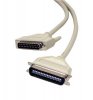
Do you know if you are using a parallel cable on this printer, as it could be that you actually are using a USB cable and this is why there is a problem. Sorry if you are already aware of this, but it is worth mentioning just in case. I've attached an image of what a parallel cable looks like:
.Do you know if you are using a parallel cable on this printer, as it could be that you actually are using a USB cable and this is why there is a problem. Sorry if you are already aware of this, but it is worth mentioning just in case. I've attached an image of what a parallel cable looks like:
Attachments
Nibiru2012
Quick Scotty, beam me up!
- Joined
- Oct 27, 2009
- Messages
- 4,955
- Reaction score
- 1,302
My Printer is already functioning. Thanks!
Good deal, glad you got it fixed. What did you do to fix it?
Others here may want to know for future reference.