SOLVED Windows 7 not recognizing my microphone?

Joined
Oct 30, 2014
Messages
2
Reaction score
0
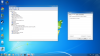
So I just upgraded my Windows Vista Home Premium 32 bit to Windows 7 Ultimate 64 bit, and before I upgraded my computer recognized my Turtle Beach X12's as a headset and a microphone. When I plugged in my headphones it only used them as a headset and didn't work as a microphone. How can I make the mic work? Here is a picture of it. I already tried showing disconnection and disabled devices as well.
f617c5f3e78f7151b376e80fb0cfd838
 

Attachments

  • f617c5f3e78f7151b376e80fb0cfd838.png
    f617c5f3e78f7151b376e80fb0cfd838.png
    477.7 KB · Views: 617

TrainableMan

^ The World's First ^
Moderator
Joined
May 10, 2010
Messages
9,357
Reaction score
1,587
32bit drivers are different than 64bit (although some installers contain both). You need 64bit drivers which probably don't exist.
Turtle Beach said:
64-bit drivers for Windows 7 and Windows Vista are available for the following products: AA_Micro, AA_Micro II, AA_Amigo, AA_SRM, AK-R8, Riviera and Montego DDL. All other "Turtle Beach" and "Voyetra" Hardware and Software Products (including the Video Advantage Capture series) were discontinued long before the release of these technologies, so they are not supported and they will not function in these systems.
Source
 
Top