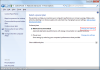
Hibernation mode is a when the contents of the system memory are written to a permanent storage medium (often a hard drive), so the computer can be powered off and yet retain all of the current user state. Once the computer is turned back on, the memory can be refreshed with the hibernation data, allowing you to resume working from the past session. Documents, applications and the desktop state would all be presented as they were at the point of clicking hibernate.
The hibernation feature is primarily designed for laptop users, as it is a very handy power-saving feature that can extend battery life when your computer is idle. However, desktop users may also find this mode handy as you can save power and resume your session very quickly.
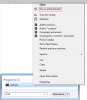
This may not be activated by default on some computers, so you will need to manually enable it. To begin, type cmd in to the start menu, then right click cmd.exe and select Run as Administrator:
![attachment.php]()
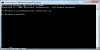
Then type in powercfg /hibernate on and press Enter. This will enable Hibernation mode. If you wish to disable hibernation mode at some point in the future, follow the same steps but replacing "on" with "off".
![attachment.php]()
You can now open the Power Options panel (Control Panel > Hardware and Sound > Power Options) and then click Change Plan Settings on your currently selected plan:
![attachment.php]()
Now click Advanced Power Settings:
![attachment.php]()
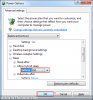
Scroll down to Allow Hybrid Sleep and select Off, then click OK:
![attachment.php]()
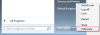
You should now notice a new option on your start menu which will allow you to place your PC in to hibernation mode.
The hibernation feature is primarily designed for laptop users, as it is a very handy power-saving feature that can extend battery life when your computer is idle. However, desktop users may also find this mode handy as you can save power and resume your session very quickly.
This may not be activated by default on some computers, so you will need to manually enable it. To begin, type cmd in to the start menu, then right click cmd.exe and select Run as Administrator:
Then type in powercfg /hibernate on and press Enter. This will enable Hibernation mode. If you wish to disable hibernation mode at some point in the future, follow the same steps but replacing "on" with "off".
You can now open the Power Options panel (Control Panel > Hardware and Sound > Power Options) and then click Change Plan Settings on your currently selected plan:
Now click Advanced Power Settings:
Scroll down to Allow Hybrid Sleep and select Off, then click OK:
You should now notice a new option on your start menu which will allow you to place your PC in to hibernation mode.