
You are using an out of date browser. It may not display this or other websites correctly.
You should upgrade or use an alternative browser.
You should upgrade or use an alternative browser.
Windows 7 defender check one file
- Thread starter anon125
- Start date


- Joined
- May 10, 2010
- Messages
- 9,357
- Reaction score
- 1,587
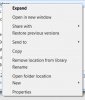
Open Windows Explorer. Right click on the folder & choose "Scan with Windows Defender"
- Joined
- May 10, 2010
- Messages
- 9,357
- Reaction score
- 1,587
Not in Windows Defender. Go to "Windows Explorer" (like "My Computer") so that you have a folder list. Then select the folder in the left pane (left click so it is highlighted) & then right-click. This is where you should have a Context Menu option for "Scan with Windows Defender". Unless the context menus were not installed (some antivirus software give you the option to not install)
Last edited:
- Joined
- May 10, 2010
- Messages
- 9,357
- Reaction score
- 1,587
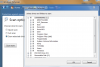
If you do not have the context menus for Windows Defender then use the custom option you showed in the first picture. Uncheck all the boxes & then start clicking on the + next to "users", then click on the + next to your loginid, & keep expanding the folders by clicking + till you get down to the folder you want to scan. check the box next to that folder & choose OK & then Scan Now