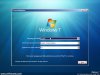
Startup Repair is an extremely useful tool which you are able to use from the Windows 7 boot CD, which allows you to repair damaged installations. Problems such as corrupt MBR, missing files and boot problems can often be fixed by running this utility.
To begin, insert your Windows 7 DVD in to a DVD drive and restart your PC to boot from this device (you may be prompted to "press any key" to boot from a CD/DVD drive). If you have a recovery partition instead of the installation CD, choose this during the advanced BIOS options stage (on Dell PCs this often accessed by CTRL+F11).
After a little wait for loading, you will be presented with the Windows 7 installation screen. Select your language and keyboard input method and then click OK to continue:
![attachment.php]()
Then select Repair your computer from the bottom right hand corner (not the install now button). Clicking this will search for installed versions of Windows 7 on your computer which you can then attempt to repair:
![attachment.php]()
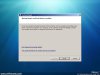
Once the scanning has finished, you will be prompted to select your Windows 7 install drive. Usually there is only 1 option. Click this and then the next button:
![attachment.php]()
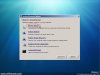
A list of recovery options will then appear, from which you should click Startup Repair:
![attachment.php]()
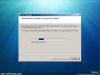
Windows 7 will then scan your computer for any potential problems:
![attachment.php]()
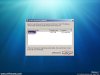
If any problems are found, you will be prompted to select the appropriate course of action. In this instance, no errors were found so there is no option to repair:
![attachment.php]()
To begin, insert your Windows 7 DVD in to a DVD drive and restart your PC to boot from this device (you may be prompted to "press any key" to boot from a CD/DVD drive). If you have a recovery partition instead of the installation CD, choose this during the advanced BIOS options stage (on Dell PCs this often accessed by CTRL+F11).
After a little wait for loading, you will be presented with the Windows 7 installation screen. Select your language and keyboard input method and then click OK to continue:
Then select Repair your computer from the bottom right hand corner (not the install now button). Clicking this will search for installed versions of Windows 7 on your computer which you can then attempt to repair:
Once the scanning has finished, you will be prompted to select your Windows 7 install drive. Usually there is only 1 option. Click this and then the next button:
A list of recovery options will then appear, from which you should click Startup Repair:
Windows 7 will then scan your computer for any potential problems:
If any problems are found, you will be prompted to select the appropriate course of action. In this instance, no errors were found so there is no option to repair: