Windows 7 includes the ability to show or hide certain files and folders that are marked as "hidden", which is handy for removing critical or private items from normal view. Once you set Windows to show hidden files, they will appear as normal but with a slightly transparent look.
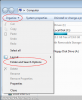
To begin, click the Organise button when you are in any folder view (clicking Computer from the start menu is a good choice). Then, select Folder and Search Options:
![attachment.php]()
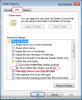
Then, click the View tab and select the box saying Show hidden files, folders and drives then click OK:
![attachment.php]()
Hidden files will now be shown! If you wish to hide them, simply click Don't show hidden files, folders and drives in the last stage.
To begin, click the Organise button when you are in any folder view (clicking Computer from the start menu is a good choice). Then, select Folder and Search Options:
Then, click the View tab and select the box saying Show hidden files, folders and drives then click OK:
Hidden files will now be shown! If you wish to hide them, simply click Don't show hidden files, folders and drives in the last stage.