RAM not all usable in 64 bit

Joined
Dec 11, 2009
Messages
41
Reaction score
0
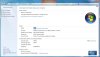
I have installed windows 7 64 bit version on new computer with a 64 bit processor Quad CPU Q8200 233 ghz , I have 4x2gb of DDR2 800 RAM 8gb in total all are same frequecy but it lists only (3.19 gb usable) after the 8gb in computer propertys

why isnt windows 7 accessing all my RAM as this is why I moved to 64 bit ?
 

catilley1092

Win 7/Linux Mint Lover
Joined
Nov 13, 2009
Messages
3,507
Reaction score
563
Is this a new home built or a new retail computer?
 
Joined
Dec 11, 2009
Messages
41
Reaction score
0
it was built by a computer technician not me and only thing not new is a old cdrom that I like, kept it along with new dvd, every thing else is new it was a clean install over XP
 
Joined
Mar 8, 2009
Messages
5,062
Reaction score
1,185
Hi MA Winterton - Welcome to w7forums

Could you please post a screen shot of this screen
Press "Windows Logo + Pause"

Alternate route - "Control Panel >> All Control Panel Items >> System"
 
Joined
Dec 11, 2009
Messages
41
Reaction score
0
I hope this works thanks
 

Attachments

  • capture.jpg
    capture.jpg
    42.4 KB · Views: 2,871
Last edited:
Joined
Dec 11, 2009
Messages
41
Reaction score
0
where would i find this setting in bios under which tab and subfolder Ive looked through and cant find it. Interesting thing is bios lists all 4 sticks of 2gb Ram but all at 333 mhz not 800 ?
 
Joined
Dec 11, 2009
Messages
41
Reaction score
0
remaping was disabled changed this then all my 8gb of ram is usable Thanks !!!!
but I find it strange that frequecy of RAM which is set to auto in bios sets it at 333mhz when its DDR2 800, have set it maually to DDR2 800 hope this is right any ideas
 
Joined
Mar 8, 2009
Messages
5,062
Reaction score
1,185
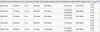
333MHz is the setting for PC5400 DDR2-667
400MHz is the setting for PC6400 DDR2-800
533MHz is the setting for PC8500 DDR2-1067

Notice the DDR label is twice the I/O Bus clock - hence - DDR (Double Data Rate)

attachment.php


Read more here - http://en.wikipedia.org/wiki/DDR_SDRAM
 

Attachments

  • DDR2.jpg
    DDR2.jpg
    41.4 KB · Views: 2,299
Joined
Dec 11, 2009
Messages
41
Reaction score
0
Thanks for all your help, I have 2 sticks of one brand and 2 of another, even through they are both DDR800 indivigually the pairs run at proper 400mhz but put them all together they run at 333mhz it looks like the 2 pairs arent compatable thanks again
 
Joined
Dec 11, 2009
Messages
41
Reaction score
0
Running 64 bit it finds all ram now as stated above that remapping is enabled just runs at wrong frequezy when both pairs of ram installed. When either of ram pairs installed indivigually runs at higher correct frequenzy as stated, so I think it still is to brands conflicting
 
Top