Windows Seven brings about one of the first biggest changes to the way the taskbar works since Windows 95. Instead of having applications listed as individual buttons on the taskbar, Windows 7 lists applications in groups as a large single icon. Clicking on this icon then reveals all instances of that program, or switches to the only instance running.
![attachment.php]()
If you find this new way of doing things confusing, you can revert back to the old way of doing things (as seen in XP and Vista). To begin, right click on the taskbar and click Properties:
![attachment.php]()
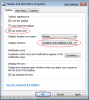
Then, tick the box labelled Use Small Icons and select Combine when taskbar is full from the "taskbar buttons" drop-down menu, then click OK:
![attachment.php]()
Now your taskbar will use the old style buttons for individual applications, showing the full text name:
![attachment.php]()
If you find this new way of doing things confusing, you can revert back to the old way of doing things (as seen in XP and Vista). To begin, right click on the taskbar and click Properties:
Then, tick the box labelled Use Small Icons and select Combine when taskbar is full from the "taskbar buttons" drop-down menu, then click OK:
Now your taskbar will use the old style buttons for individual applications, showing the full text name: