Multiple Backgrounds!

BetaMan

Official G33k
Joined
Jan 15, 2009
Messages
463
Reaction score
29
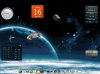
It's pretty easy to do, Just Right-Click on your desktop, select "Personalize", click "Desktop Backgrounds", then navigate to a folder and select all you want. You can also monitor when they change, for instance, mine change every 30 minutes.
 

Attachments
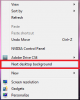
  • desktop bgs.png
    desktop bgs.png
    16.4 KB · Views: 2,872
  • Changing desktop example.jpg
    Changing desktop example.jpg
    43.8 KB · Views: 63,206
Last edited:
Joined
Aug 19, 2015
Messages
3
Reaction score
0
Yes but what about having individual backgrounds for multiple monitors? Can you have a background for one of three monitors but just a black background for the others?
 
Top