Windows 7 includes a handy tool which allows you to perform a basic set of memory diagnostic, helping you identify problems with your RAM. If you are experiencing random BSODs, crashes or hangs it is worth using this tool as part of the diagnostic procedure.
There are several ways you can launch the Memory Diagnostics tool, depending on the state your Windows 7 installation is in. If Windows has errors serious enough to prevent booting, you can access the memory diagnostics tool by booting from the W7 DVD and choosing "Repair your Computer", then the Memory Diagnostics tool.
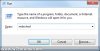
If you can boot in to Windows 7 without a problem, run "mdsched" from the run box (press Windows Key + R to access this).
![attachment.php]()
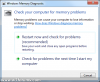
Then decide if you want to restart now or when you have finished working on your PC:
![attachment.php]()
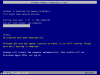
Your PC will then restart and begin the memory test, which should take less than 10 mins on most machines (you can change the memory testing options by pressing F1):
![attachment.php]()
Once this is complete your system will boot back in to Windows 7, and if there are any problems more information will be displayed. If no errors were detected then no additional information will appear.
There are several ways you can launch the Memory Diagnostics tool, depending on the state your Windows 7 installation is in. If Windows has errors serious enough to prevent booting, you can access the memory diagnostics tool by booting from the W7 DVD and choosing "Repair your Computer", then the Memory Diagnostics tool.
If you can boot in to Windows 7 without a problem, run "mdsched" from the run box (press Windows Key + R to access this).
Then decide if you want to restart now or when you have finished working on your PC:
Your PC will then restart and begin the memory test, which should take less than 10 mins on most machines (you can change the memory testing options by pressing F1):
Once this is complete your system will boot back in to Windows 7, and if there are any problems more information will be displayed. If no errors were detected then no additional information will appear.