- Joined
- Apr 20, 2009
- Messages
- 2
- Reaction score
- 0
Hey guys...
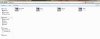
I've got a lil problem - when Windows explorer opened - the library shows up - but the actual image for the icons are not there anymore - i get to see them when i select the view to large and extra large icons and content.. Most of the icons in the side panel of the explorer windows are also screwed up...
Pls help.
Ive attached a pic of my explorer view...
Thanks..
Winter
I've got a lil problem - when Windows explorer opened - the library shows up - but the actual image for the icons are not there anymore - i get to see them when i select the view to large and extra large icons and content.. Most of the icons in the side panel of the explorer windows are also screwed up...
Pls help.
Ive attached a pic of my explorer view...
Thanks..
Winter