How to move C:\Users\Public to 2nd hard drive ?

Joined
May 7, 2010
Messages
1,279
Reaction score
141
I just recieved my RMA'd Western Digital Caviar Black 1.0 TB. hard drive from New Egg yesterday. I've already moved my User folders to the new drive.
Does anyone on the forum no how to move C:\Users\Public to my second hard drive as D:\Users\Public ?
I especially want the Recorded TV folder there.
Any help with this is appreciated.
 
Joined
May 7, 2010
Messages
1,279
Reaction score
141

Attachments

  • PublicUserFolder.PNG
    PublicUserFolder.PNG
    139.9 KB · Views: 1,423
Joined
Nov 30, 2009
Messages
1,752
Reaction score
396
Edit the Public key at this location in Regedit:

HKEY_LOCAL_MACHINE\SOFTWARE\Microsoft\Windows NT\CurrentVersion\ProfileList

Reboot.
 
Joined
May 7, 2010
Messages
1,279
Reaction score
141
What do I change the Public keys settings to ?

What do I change the Public key's setting's to ? D:\Users\Public ? Does this move the contents of the Public folders or do I need to creat the D:\Users|Public folder and sub-folders ?
Edit the Public key at this location in Regedit:

HKEY_LOCAL_MACHINE\SOFTWARE\Microsoft\Windows NT\CurrentVersion\ProfileList

Reboot.
 

Attachments

  • regedit.PNG
    regedit.PNG
    110.2 KB · Views: 1,361
Joined
Sep 22, 2010
Messages
613
Reaction score
102
Joined
May 7, 2010
Messages
1,279
Reaction score
141
Changed registry key

I changef the registry key to D:Users\Public after taking ownership of Public folder. It only moved the following folders without there contents. Public Documents, Public Music and Publick Videos. It didn'y move Sample Music, Sample Videos or Recorded TV. I copied these folders over to D;Users\Public and put them where they are suppposed to go. ie: Sample Videos in Public Videos, Sample Pictures in Public Pictures and Sample Music in Public Music. Is there anything else I need to do? PS Pblic folder categories don't have a Location tab.
Yes, D:\Users\Public in place of %SystemDrive%\Users\Public.
Idwote] iAfter reboot, the folder should move. If not, you need to move it manually, first taking ownership of it.

Same stuff as TG linked:


http://www.howtogeek.com/howto/windows-vista/move-the-public-folder-in-windows-vista/


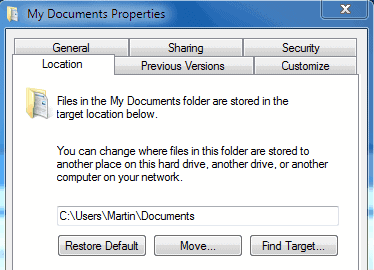
You can also move individual user folders by right clicking on them -> properties -> location -> change path

(picture from ghacks.net)

my_documents.png
 

TrainableMan

^ The World's First ^
Moderator
Joined
May 10, 2010
Messages
9,357
Reaction score
1,587
Never tried with public folders, it may be you don't have high enough access to move public.

In general I have found the easiest way to move the folders is to drag and drop & the system is smart enough to move system pointers when the folder moves.
 
Top