To analyse the cause of system crashes, it's a good idea to have Windows 7 to create small memory dumps which contain further details of the problem.
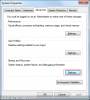
To enable this functionality, type "view advanced system settings" in to the search menu search box and run the result found under the control panel section. Then, click Settings under the "Startup and Recovery" section of the advanced tab:
![attachment.php]()
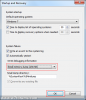
Then, make sure you have Small Memory Dump selected from the "write debugging information" section. By default, all minidump files will be saved in %SystemRoot%\Minidump, usually C:\Windows\Minidump:
![attachment.php]()
Click OK when you have changed the settings and then close the remaining window. Small Memory Dumps are now enabled.
To enable this functionality, type "view advanced system settings" in to the search menu search box and run the result found under the control panel section. Then, click Settings under the "Startup and Recovery" section of the advanced tab:
Then, make sure you have Small Memory Dump selected from the "write debugging information" section. By default, all minidump files will be saved in %SystemRoot%\Minidump, usually C:\Windows\Minidump:
Click OK when you have changed the settings and then close the remaining window. Small Memory Dumps are now enabled.