Windows 7 has a handy file cleanup tool which finds and removes unnecessary files which accumulate on your PC over time. Many of these files will be old "temporary" files that are used once but now just take up space.
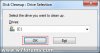
To begin the cleanup tool, run cleanmgr.exe or type "Disk Cleanup" in to the start menu search and run that.You will first be prompted to select a disk drive to perform the cleanup on, then click OK:
![attachment.php]()
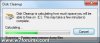
A scan will then take place for a few moments:
![attachment.php]()
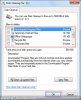
You now have the option to select which type of files you wish to delete, ranging from temporary files to archived error reports. Tick the boxes that correspond to the items you want to delete and then click OK:
![attachment.php]()
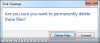
Click "delete files" in the confirmation window if you are sure that you wish to remove them:
![attachment.php]()
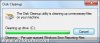
A progress bar will then appear while the files are removed, after this, you have re-gained some extra disk space:
![attachment.php]()
To begin the cleanup tool, run cleanmgr.exe or type "Disk Cleanup" in to the start menu search and run that.You will first be prompted to select a disk drive to perform the cleanup on, then click OK:
A scan will then take place for a few moments:
You now have the option to select which type of files you wish to delete, ranging from temporary files to archived error reports. Tick the boxes that correspond to the items you want to delete and then click OK:
Click "delete files" in the confirmation window if you are sure that you wish to remove them:
A progress bar will then appear while the files are removed, after this, you have re-gained some extra disk space: