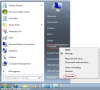
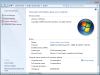
Windows 7 will automatically create a system restore point at scheduled times or whenever you install something significant, such as an application or new driver. If you wish to create one manually, click on the Start Menu then right click Computer and select Properties:
![attachment.php]()
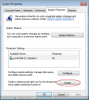
This will load the system information window, where you should now click System Protection:
![attachment.php]()
Your system restore settings will be displayed in this window and to create a new restore point simply click Create:
![attachment.php]()
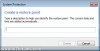
Enter a descriptive name for the restore point so that you can identify it in future, and then click Create:
![attachment.php]()
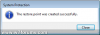
The system will then compile all of the required data and create the new system restore point. Once the message below appears, the process is complete:
![attachment.php]()
This will load the system information window, where you should now click System Protection:
Your system restore settings will be displayed in this window and to create a new restore point simply click Create:
Enter a descriptive name for the restore point so that you can identify it in future, and then click Create:
The system will then compile all of the required data and create the new system restore point. Once the message below appears, the process is complete: