Windows 7 no longer includes the option to use the "classic" start menu used in previous versions of Windows such as 95/98 and also available as an option in XP/Vista. However, it is possible to emulate the functionality of the old classic start menu quite easily.
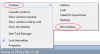
First, right click on the taskbar and click Toolbars > New Toolbar:
![attachment.php]()
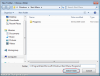
Then when prompted to select a folder to display, enter C:\ProgramData\Microsoft\Windows\Start Menu\Programs which is the global start menu folder, then click Open:
![attachment.php]()
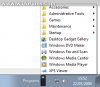
Now you will have most of the functionality of the old classic start menu when you click on the small double icon arrow on your taskbar:
![attachment.php]()
Please be aware that only applications which are available to all users are displayed in this menu. If you want to have applications only available to individual usernames appear, you will need to copy the shortcuts to the global folder manually (or link to the username programs folder and copy all global shortcuts). This is not an ideal solution to the lack of classic start menu, but it is a good compromise until a 3rd party application can perform this task in Windows 7.
First, right click on the taskbar and click Toolbars > New Toolbar:
Then when prompted to select a folder to display, enter C:\ProgramData\Microsoft\Windows\Start Menu\Programs which is the global start menu folder, then click Open:
Now you will have most of the functionality of the old classic start menu when you click on the small double icon arrow on your taskbar:
Please be aware that only applications which are available to all users are displayed in this menu. If you want to have applications only available to individual usernames appear, you will need to copy the shortcuts to the global folder manually (or link to the username programs folder and copy all global shortcuts). This is not an ideal solution to the lack of classic start menu, but it is a good compromise until a 3rd party application can perform this task in Windows 7.