Windows 7 allows you to change the product key (or sometimes called serial number) of the product, even once you have already fully installed Windows. This can be useful if you buy a new license and need to swap keys.
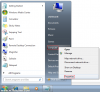
To begin, right click Computer on the start menu and select Properties:
![attachment.php]()
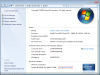
Now, scroll to the bottom of this window and click Change Product Key:
![attachment.php]()
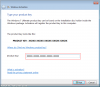
You can then enter the new key in the box provided and then click Next:
![attachment.php]()
Windows will then spend a few moments checking that this key is valid:
![attachment.php]()
Once complete, you a confirmation is displayed to let you know that the new key has successfully been updated:
![attachment.php]()
To begin, right click Computer on the start menu and select Properties:
Now, scroll to the bottom of this window and click Change Product Key:
You can then enter the new key in the box provided and then click Next:
Windows will then spend a few moments checking that this key is valid:
Once complete, you a confirmation is displayed to let you know that the new key has successfully been updated: