If you bought a computer system with Windows 7 pre-installed, there's a good chance that you'd like to change your computer name to something easier to identify. This guide will show you how you can change this name with a few simple steps.
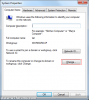
First, run "sysdm.cpl" either from the start menu or via the run menu (press WINDOWS KEY + R to load this). This should load the "Advanced Systems Settings" panel.
Now click "Change":
![attachment.php]()
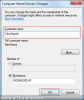
Now enter a new computer name:
![attachment.php]()
![attachment.php]()
First, run "sysdm.cpl" either from the start menu or via the run menu (press WINDOWS KEY + R to load this). This should load the "Advanced Systems Settings" panel.
Now click "Change":
Now enter a new computer name:
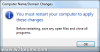
When you are done click OK. You will then be prompted to restart your PC to complete the changes:
Once your computer has been restarted, the system name should have changed. You can confirm this by repeating step 1 to check the displayed name.