I was playing Star Trek Online yesterday, and suddenly my PC completely froze up. Mouse and keyboard would not respond either. I hit the reset button and when it tried to load I got BSOD. Computer will only start up in safe mode now. I have tried running disk check, which took over 6 hours and found nothing, and I tired the Windows Memory Diagnostic tool, which made it to 21% and then made no further progress in over an hour.
I also tried uninstalling my Nvidia drivers, but have had numerous issues with that, telling me certain ones cannot be uninstalled in safe mode, specifically the PhysX driver. I downloaded and tried to install latest driver form my card, a 560TI, but says that it cannot install in safe mode either.
I tried to run Speccy, and it cannot access all of the computer components either.....
I'm not sure what had caused all this, I have not updated my drivers in the last few weeks, and not had an issue. The only thing new with this PC is the mouse. My Logitech G500 starting turning on and off repeatedly, in all USB ports. I tied a friends HP mouse and this issue stopped, so I doubt it was the USB ports. Last week I bought a new Logitech G502 Proteus Core and haven't had any issues with it so far.
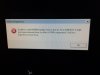
Attached are images of the errors I've been getting.
I also tried uninstalling my Nvidia drivers, but have had numerous issues with that, telling me certain ones cannot be uninstalled in safe mode, specifically the PhysX driver. I downloaded and tried to install latest driver form my card, a 560TI, but says that it cannot install in safe mode either.
I tried to run Speccy, and it cannot access all of the computer components either.....
I'm not sure what had caused all this, I have not updated my drivers in the last few weeks, and not had an issue. The only thing new with this PC is the mouse. My Logitech G500 starting turning on and off repeatedly, in all USB ports. I tied a friends HP mouse and this issue stopped, so I doubt it was the USB ports. Last week I bought a new Logitech G502 Proteus Core and haven't had any issues with it so far.
Attached are images of the errors I've been getting.
Attachments

Last edited: