If you are prompted to login to Windows 7 each time you turn on your PC, you can change this so that you are automatically logged in with a few simple steps. This is much more convenient, but it is worth noting that it should only be done if you are aware that anyone with access to your PC could use it.
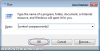
To begin, load the run box by pressing WINDOWS KEY + R, then type "control userpasswords2" and click OK:
![attachment.php]()
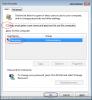
This will load a list of all the user accounts within Windows. Select the account you wish to use as the automatic login by clicking on it, and then untick the "users must enter a username and password to use this computer" box. Then click apply:
![attachment.php]()
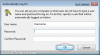
Another window will then appear which prompts you to enter the password (twice) for the auto login account. Once you have done this, click OK:
![attachment.php]()
Next time you start your PC you should now be logged in automatically.
To begin, load the run box by pressing WINDOWS KEY + R, then type "control userpasswords2" and click OK:
This will load a list of all the user accounts within Windows. Select the account you wish to use as the automatic login by clicking on it, and then untick the "users must enter a username and password to use this computer" box. Then click apply:
Another window will then appear which prompts you to enter the password (twice) for the auto login account. Once you have done this, click OK:
Next time you start your PC you should now be logged in automatically.